You are booking a Shinkansen ticket, a hotel, or an event on a Japanese website. You type in your card, and you get a vague error or a Japanese message saying the card cannot be used. Travelers and residents report this often, even when the same card works everywhere else.
The reason is usually not one thing. A payment passes through several systems, and any of them can say no.
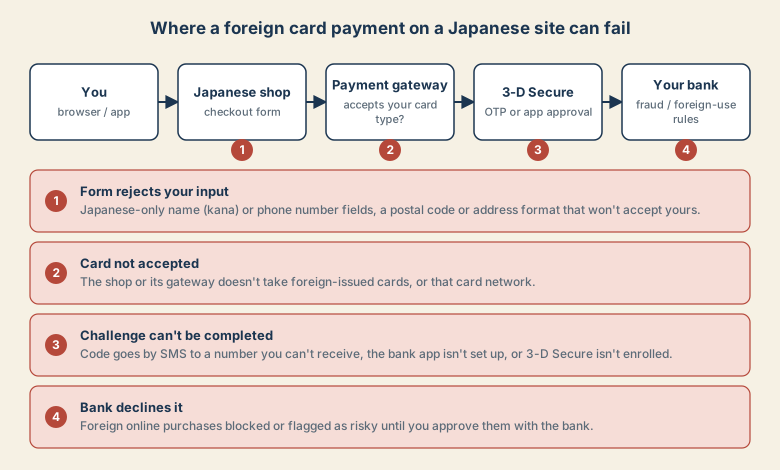
The four failure points
1. The checkout form rejects your input. Many Japanese forms require a name in katakana, a Japanese-format phone number, a Japanese postal code and address. If you cannot fill the fields, the order cannot go through before the card is even tried.
2. The shop or gateway does not accept your card. Some merchants and payment providers limit which foreign-issued cards or networks they accept. Nothing is wrong with your card.
3. The 3-D Secure step fails. 3-D Secure is the extra check where your bank sends a one-time code or asks you to approve in an app. Japan's push for merchants to adopt 3-D Secure 2.0 around early 2025 made this check more common. It fails when the code goes by SMS to a number you cannot receive, when you never set up the bank's app, or when the card is not enrolled.
4. Your bank declines. Banks often block or flag online purchases from overseas merchants until you approve them. A first-time foreign merchant can look like fraud.
Try these in order
- Check the form. Enter your name exactly as on the card. For a kana field, use katakana for your name's sound (for example
JOHN SMITHasジョン スミス). If a phone field will not accept your number, look for an "overseas" option on the page. - Check your bank. In the card app or by phone, confirm that online purchases and international or foreign-merchant use are enabled, and that the card is enrolled in the network's 3-D Secure program (names vary: Visa Secure, Mastercard Identity Check, J/Secure, SafeKey).
- Make sure you can receive the code. If the code goes by SMS, you need your home number working abroad, or switch the bank to app approval before you travel.
- Remove variables. Turn off a VPN, use the browser you normally use, and avoid retrying many times in a row, which can lock the card.
- Try another card or network. A different card from a different bank, or a card on another network, sometimes passes when the first fails.
- Look for an English or overseas version. Some operators run a separate international site with broader card support.
- Change the channel. Pay on arrival, book through a global booking platform, or email the business and ask how foreign guests should pay.
What to tell your bank
Be specific. For example: "I'm trying to pay a Japanese merchant online and the 3-D Secure step is failing. Can you confirm the card is enrolled, allow this merchant, and tell me where the one-time code will be sent?"
Be careful with shortcuts
Proxy services that offer to pay on your behalf exist, but they handle your money and data. Check reviews and the business's identity, and avoid sharing card numbers or one-time codes over chat or email.
Quick checklist
- Fails before 3-D Secure? Look at the form fields and merchant acceptance.
- Fails at 3-D Secure? Confirm enrollment and where the code is sent.
- Declined after it? Call the bank and approve the merchant.
- Still stuck? Change the channel instead of repeating the same attempt.