You are staring at a Japanese error dialog, a government form, or a hotel Wi-Fi login page. Translating the screen is easy once you pick the right tool for the situation.
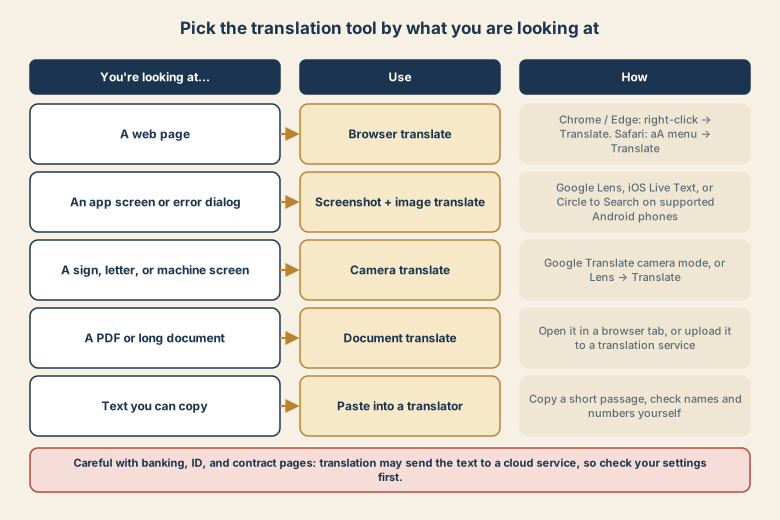
A web page: use the browser
- Chrome or Edge: right-click the page and choose Translate to English, or use the translate icon in the address bar.
- Safari (iPhone and Mac): use the aA menu (iPhone) or the translate button in the address bar (Mac) and choose Translate to English.
This keeps the layout and lets you click links and fill forms, which matters for checkouts and bookings.
An app screen or error dialog: use a screenshot
Apps are not web pages, so the browser cannot translate them. Instead:
- iPhone: take a screenshot or open the camera, tap the text-recognition (Live Text) icon, then choose Translate.
- Android: use Google Lens on a screenshot, or Circle to Search on phones that support it.
- PC: take a screenshot and open it in a translation or Lens tool.
Printed text, signs, and machines: use the camera
Point Google Translate's camera mode (or Lens → Translate) at the text. It overlays the translation on the live image, which works well for menus and ticket machines.
Documents and PDFs
Open the file in a browser tab and use browser translate, or upload it to a translation service. For long, important documents, translate a section and have someone confirm the meaning before you act.
Keep the Japanese original
Do not throw away the original text. For an error message:
- Copy the original Japanese (or the error code).
- Search it in Japanese. Support pages and forums often have the exact fix.
- Use the translation only to understand what you found.
Machine translation can change product names, and a mistranslated button label can mislead you. If a screen matters, compare the translation with the original text.
When to be careful
- Banking, ID, tax, and contract pages: verify amounts, dates, and names yourself. Do not rely on an automatic translation to confirm a legal commitment.
- Pages with account details: translation tools may send text to a cloud service. Check your tool's settings, or use an on-device option if you need to.
- Forms: after translating, re-check that you are entering information in the right field. Short labels are the easiest to mistranslate.
Change the interface language when you can
If the app supports English, switching its language removes the problem. On recent iOS and Android versions you can often set a language for a single app without changing the whole phone, in the app's entry in Settings.
Quick checklist
- Web page: browser translate.
- App screen: screenshot plus Lens or Live Text.
- Signs and machines: camera translate.
- Keep the Japanese original for searching.
- Verify numbers, dates, and names on important pages.