You need to fill in a Japanese form, search a Japanese site, or message someone in Japanese. Your keyboard has only the Latin alphabet. That is fine: Japanese input on a standard keyboard works through an input method editor (IME). You type the sound in Latin letters, the IME converts it to kana, and then to kanji.
Add a Japanese keyboard
Menu names shift between versions, but the paths below are the usual ones.
iPhone / iPad: Settings → General → Keyboard → Keyboards → Add New Keyboard → Japanese, then choose Romaji. Tap the globe key to switch.
Android (Gboard): Settings → System → Languages & input → On-screen keyboard → Gboard → Languages → Add keyboard → Japanese, and pick the QWERTY/Romaji layout.
Windows 11: Settings → Time & language → Language & region → Add a language → Japanese. Switch input methods with Win + Space. In the Japanese IME, the A/あ indicator in the taskbar toggles direct typing and kana.
macOS: System Settings → Keyboard → Text Input → Input Sources → Edit → add Japanese with the Romaji option. Switch with the globe key or Control + Space.
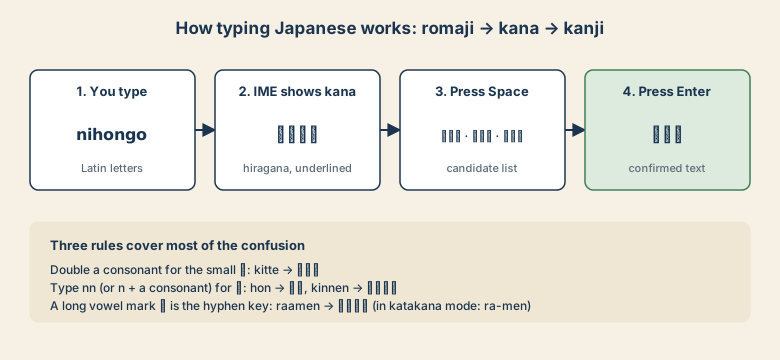
How conversion works
- Type
nihongo. The IME showsにほんご. - Press Space. A list of candidates appears:
日本語, and other words that share the sound. - Press Space again to move through candidates, or pick one on a phone.
- Press Enter to confirm.
If the first guess is right, you can press Enter right away.
The romaji rules that cause most mistakes
| You want | Type | Result |
|---|---|---|
| A small っ (pause) | double the consonant: kitte |
きって |
| ん | nn, or n before a consonant: hon |
ほん |
| ん before a vowel | nn: kinnen |
きんえん |
| ー (long-vowel mark, in katakana) | hyphen key: ra-men |
ラーメン |
| Small ゃ ゅ ょ | kya kyu kyo |
きゃ きゅ きょ |
| ふ | fu (or hu) |
ふ |
| し, ち, つ | shi/si, chi/ti, tsu/tu |
し, ち, つ |
| を | wo |
を |
If you mistype, press Esc (or the backspace key) before confirming.
Katakana and Latin letters
Foreign words and many product names are written in katakana. On Windows, type the word in hiragana and press F7 to turn it into katakana. F8 gives half-width katakana, F9 full-width Latin letters, and F10 half-width Latin letters. To type English words in the middle of a sentence, switch the IME to direct input (the A/あ toggle) first.
Names and forms
Japanese forms often ask for a name twice: once in kanji or Latin letters and once in kana (the reading). For a Latin-script name, use katakana for the sound, for example Smith as スミス. Type sumisu, press Space, and choose the katakana form.
Quick checklist
- Add the Japanese input method with Romaji layout.
- Type by sound, Space to convert, Enter to confirm.
- Remember the three rules: doubled consonant,
nn, hyphen for ー. - Windows: F7 for katakana.