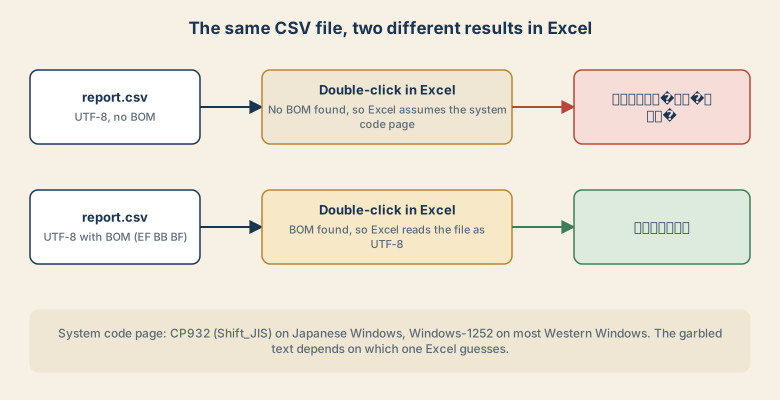
You export a CSV from your app or database. In a text editor it shows 日本語のテスト perfectly. Then someone double-clicks it in Excel and sees 譌・譛ャ隱槭�ョ繝�繧ケ繝�. Nothing is wrong with the file. Excel is reading the bytes with the wrong encoding.
What is actually happening
A CSV file has no field that says "I am UTF-8". Excel has to guess. When you double-click a file, it checks for a byte order mark (BOM), three bytes (EF BB BF) at the very start of the file. If it finds one, it reads the file as UTF-8. If not, it falls back to the system code page: CP932 (the Windows version of Shift_JIS) on Japanese Windows, and Windows-1252 on most Western Windows systems. Behavior can differ between Excel versions, but the BOM is the signal that works reliably.
Read the garbage to find the cause
The shape of the garbled text tells you which two encodings were mixed up.
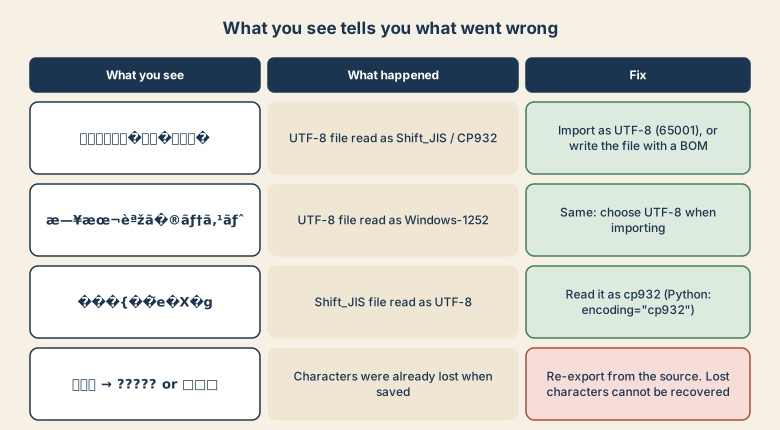
- Kanji-looking nonsense such as
譌・譛ャ隱: a UTF-8 file read as Shift_JIS/CP932. This is the classic case for Japanese data opened on a Japanese PC. - Accented Latin letters such as
日本語: the same UTF-8 file read as Windows-1252. This is what you see on a Western PC. - Replacement diamonds
�mixed with symbols: a Shift_JIS file read as UTF-8. - Question marks
?or boxes: the characters were already lost when the file was saved. No setting can bring them back; re-export from the source.
Fix 1: open the existing file correctly
Do not double-click. Instead:
- Open Excel and create or open a blank workbook.
- Go to Data → From Text/CSV and choose the file.
- In the preview window, set File Origin to 65001: Unicode (UTF-8).
- Check that the preview looks right, then click Load.
For a Shift_JIS file that shows � in a UTF-8 preview, choose 932: Japanese (Shift-JIS) instead.
Fix 2: export files that open correctly for everyone
If you generate the CSV, add the BOM. In Python:
import csv

with open("report.csv", "w", encoding="utf-8-sig", newline="") as f:
    writer = csv.writer(f)
    writer.writerow(["名前", "売上"])
    writer.writerow(["東京支店", 120000])
With pandas:
df.to_csv("report.csv", index=False, encoding="utf-8-sig")
In JavaScript, prepend "\uFEFF" to the string before you write it:
const bom = "\uFEFF";
fs.writeFileSync("report.csv", bom + csvText, "utf8");
Fix 3: when your readers use only Japanese Excel
Some Japanese business workflows still expect Shift_JIS. You can write CP932 directly:
df.to_csv("report.csv", index=False, encoding="cp932")
Be careful: CP932 cannot represent every character (emoji and many rare symbols fail). Python raises an error unless you pass errors="replace", which silently swaps such characters for ?. If your data may contain them, prefer UTF-8 with a BOM.
When the BOM is the wrong answer
A BOM is a fix for Excel, not a universal improvement. Some parsers and database import tools read it as part of the first header name, so the first column ends up called \ufeffid instead of id. Use a BOM for files people open in Excel. Leave it out for files that programs consume.
Quick checklist
- Readable in a text editor but garbled in Excel? Encoding mismatch, not corruption.
- Need it open right now? Data → From Text/CSV → 65001 (or 932 for Shift_JIS).
- Generating it? Write
utf-8-sigfor Excel users. - Seeing only
?characters? Re-export; the data is gone.