You open a customer list and see Müller instead of Müller. A web page shows Größe instead of Größe. A price reads 30 €. These are classic mojibake: the bytes are right, but the program is reading them with the wrong encoding.
The decoder
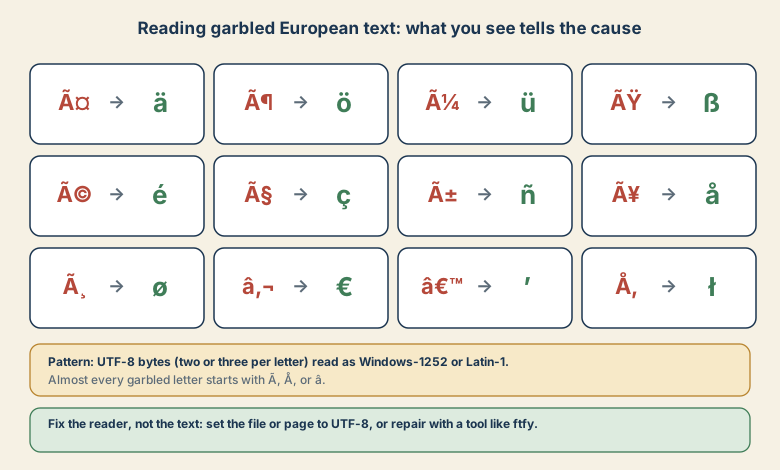
UTF-8 writes each non-ASCII letter as two or three bytes. If a program assumes Windows-1252 or Latin-1 instead, it shows each byte as its own character. The first byte of most European accented letters (C3, C5) becomes à or Å, and the euro sign (E2 82 AC) becomes €.
| Should be | You see |
|---|---|
| ä ö ü ß | ä ö ü ß |
| é è ç ñ | é è ç ñ |
| å ø | Ã¥ ø |
| € ’ | € ’ |
| ł ą | Å‚ Ä… |
Where to look first
- Web pages: Declare
<meta charset="utf-8">early in the<head>, and sendContent-Type: text/html; charset=utf-8from the server. - CSV and text files: Save as UTF-8. For files opened in Excel, add a BOM (
utf-8-sig). See the Excel CSV guide. - Databases: Use
utf8mb4in MySQL and MariaDB for columns and for the connection (SET NAMES utf8mb4, or set it in your driver). - Email: Check the
Content-Typecharset header of the message. - APIs and scripts: Be explicit about encodings when reading and writing, instead of relying on defaults.
Repairing text that is already damaged
If the damage came from exactly one wrong decode, you can reverse it. In Python:
bad = "Größe: 30 €"
good = bad.encode("cp1252").decode("utf-8")
print(good)   # Größe: 30 €
This works for simple cases. Real data often fails, for example when a character maps to a byte that Windows-1252 leaves undefined (such as the right double quote in �), the conversion raises an error, or the text was damaged more than once. The ftfy library is built for this:
import ftfy
print(ftfy.fix_text("Größe: 30 €"))
Always keep a copy of the original and check the result by reading it.
The opposite problem: � symbols
If a Latin-1 or Windows-1252 file is read as UTF-8, you see replacement characters (�) where the accents should be. Read the file with the right legacy encoding and save it as UTF-8:
text = open("legacy.txt", encoding="cp1252").read()
open("utf8.txt", "w", encoding="utf-8").write(text)
Central and Eastern Europe
Languages like Polish, Czech, and Hungarian have been written with Windows-1250 or ISO-8859-2, which differ for some letters. If characters like ł, ő, or ű are wrong, you may have the wrong one of the two. Converting everything to UTF-8 at the boundary ends the guessing.
Quick checklist
- Seeing Ã, Å, or â before odd symbols? UTF-8 read as Windows-1252.
- Seeing �? Legacy text read as UTF-8.
- Set UTF-8 everywhere: file, page header, database, connection.
- Repair with Python or ftfy, and never overwrite your only copy.
For the same idea in Japanese, where the garbage looks different, see garbled Japanese in Excel.