If your logs show a job that ran twice on the night the clocks went back, or a nightly report that never ran when they moved forward, nothing is wrong with the scheduler. The local time you picked either happened twice or did not exist.
The two bad hours
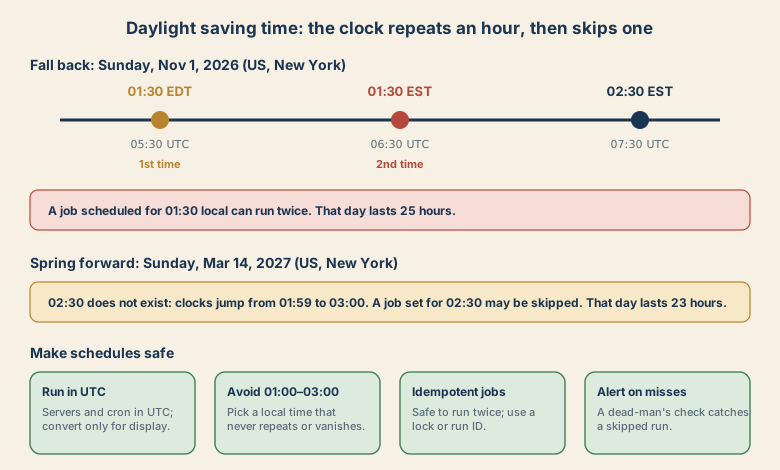
Fall back. On Sunday, November 1, 2026 in New York, clocks went from 01:59 daylight time back to 01:00 standard time. The wall-clock time 01:30 occurred twice: once at 05:30 UTC and again at 06:30 UTC. The day was 25 hours long. In Berlin it was the same story on October 25, with 02:30 occurring twice.
Spring forward. On Sunday, March 14, 2027, clocks in New York jump from 01:59 to 03:00. The wall-clock time 02:30 does not exist, and the day is 23 hours long. EU countries change on March 28, 2027.
You can see it in Python with zoneinfo:
from datetime import datetime, timezone
from zoneinfo import ZoneInfo

ny = ZoneInfo("America/New_York")

# The same wall-clock time, twice
for fold in (0, 1):
    t = datetime(2026, 11, 1, 1, 30, tzinfo=ny, fold=fold)
    print(fold, t.isoformat(), "->", t.astimezone(timezone.utc).isoformat())
# 0 2026-11-01T01:30:00-04:00 -> 2026-11-01T05:30:00+00:00
# 1 2026-11-01T01:30:00-05:00 -> 2026-11-01T06:30:00+00:00

# A time that does not exist
t = datetime(2027, 3, 14, 2, 30, tzinfo=ny)
print(t.astimezone(timezone.utc).astimezone(ny).isoformat())
# 2027-03-14T03:30:00-04:00   (it was silently moved)
The fold attribute says which of the two repeated moments you mean. Without it, you get the first by default, which is how the second occurrence goes missing or doubles up in a naive program.
Typical failure patterns
- Double run: a job set for 01:30 local fires at both 01:30 moments (or a scheduler that retries "missed" runs fires it again).
- Skipped run: a job set for 02:30 on spring-forward night has no valid time, and is skipped or shifted depending on the tool.
- Wrong date math: "run 24 hours after the last run" versus "run at the same local time tomorrow". They differ by an hour across a change.
- Duplicate or missing rows: an hourly report keyed by local hour has two rows for 01:00 or none for 02:00.
- Billing and cut-offs: daily totals computed as "midnight to midnight local" are 25 or 23 hours long.
Make schedules safe
- Run servers and schedulers in UTC. UTC has no clock changes. Convert to local time only when showing times to a person.
- Store timestamps in UTC, with the time zone name kept separately if you need to recreate local time.
- If you must use local time, avoid 01:00 to 03:00. Pick a time that never repeats or disappears in the zones you serve, such as 04:00.
- Make jobs idempotent. A second run should do no harm: use a lock, a run ID, or a "last processed" marker.
- Know what you mean by "a day". For calendar logic, use a time zone-aware library and add calendar days, not 24-hour intervals.
- Monitor. Add a dead-man's check that alerts when an expected run is missing, and a duplicate-run check for money-moving jobs.
- Test the edges. Run your schedule logic against the transition dates in a test, in the time zones your users are in.
Quick diagnosis
- Two runs at the same local time on the change date: fall-back duplicate. Add a lock and move the schedule.
- No run at all on the change date: a time in the skipped hour. Move the schedule out of 01:00 to 03:00.
- Run is an hour off for several weeks: the system time zone and your assumptions disagree. Check
timedatectl(Linux) and your application's zone setting.
The next clock changes are scheduled for March 14, 2027 in the US and March 28, 2027 in the EU, if the rules stay as they are. That is plenty of time to fix the schedules.
Dates as scheduled under current rules, as of November 5, 2026.