A certificate that quietly expires is one of the most common causes of a website outage. The industry is now making certificates expire more often on purpose, so that automation becomes the only sensible way to manage them.
The schedule
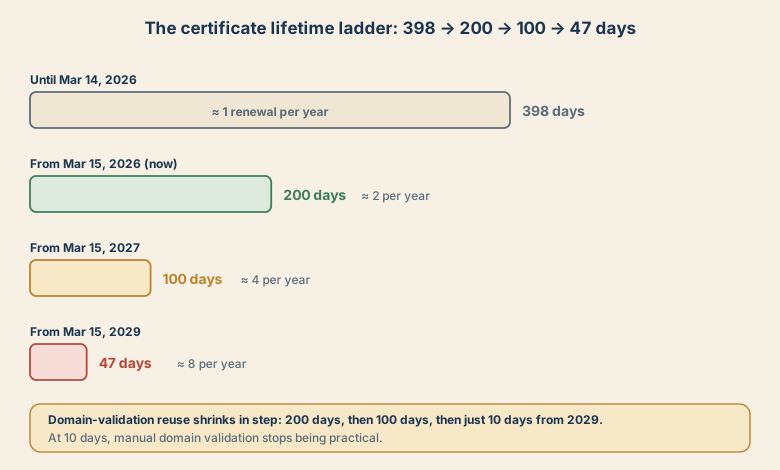
Under CA/Browser Forum ballot SC-081v3, the maximum validity of publicly trusted TLS certificates steps down:
| From | Maximum lifetime | Renewals per year (about) |
|---|---|---|
| Until March 14, 2026 | 398 days | 1 |
| March 15, 2026 (now) | 200 days | 2 |
| March 15, 2027 | 100 days | 4 |
| March 15, 2029 | 47 days | 8 |
The reuse period for domain control validation (the proof that you own the domain) shrinks alongside: 200 days now, then 100 days, and just 10 days from 2029. That detail matters most. A person who must click an email link or edit a DNS record by hand every few weeks will eventually forget one.
Check what you have
On any machine with OpenSSL, see the expiry date of a live site:
echo | openssl s_client -connect example.com:443 -servername example.com 2>/dev/null \
  | openssl x509 -noout -dates -issuer
To get a yes or no answer for a certificate file (useful in monitoring), test whether it expires within 30 days:
openssl x509 -in cert.pem -noout -checkend 2592000 \
  && echo "OK: valid for more than 30 days" \
  || echo "WARNING: expires within 30 days"
Make a list of every place a public certificate lives. People forget more than they expect: the website, the mail server, the NAS web interface, the router or VPN portal, the monitoring dashboard, the staging site, and the vendor appliance in the closet.
What can be automated, and what cannot
Easy: websites and servers where you control the web server. ACME clients such as Certbot, acme.sh, or the built-in support in Caddy renew automatically. Many hosting platforms and CDNs handle it for you.
Needs a plan:
- Wildcard certificates need DNS validation. Use a DNS provider with an API, and give the ACME client a narrowly scoped token.
- Appliances and panels with no ACME support: NAS boxes, routers, printers, older management interfaces. Options are a reverse proxy in front (that renews and forwards), an internal certificate from a private CA, or asking the vendor.
- Multiple servers sharing one certificate. Decide which machine requests it and how it is distributed. Automate the copy and the reload, not only the issuance.
Check the renewal threshold
Some setups renew a fixed number of days before expiry. A rule of "renew 30 days before expiry" is fine for a 200-day certificate, but with a 47-day certificate it renews after only 17 days of use. That is safe, but it means more frequent requests, so check rate limits and your logs. The goal is to have enough time to notice and fix a failed renewal before anyone sees an error.
Alert on failure, not only on expiry
Automation fails quietly: a DNS token expires, a firewall blocks the validation request, a web server is not reloaded. Add two checks:
- A monitor that alerts when any certificate has fewer than, say, 14 days left.
- A log or notification on renewal failure.
Either one would have caught most real-world expiry outages.
A small-site checklist
- List every public certificate and where it lives.
- For each, note who or what renews it.
- Replace any manual renewal with ACME or a managed service.
- Put non-ACME devices behind a proxy, or onto a private CA.
- Add expiry monitoring with a warning at 14 days.
- Test a renewal on purpose once, and confirm the service picks up the new certificate.
Sources
- CA/Browser Forum ballot SC-081v3 summary (Sectigo Store)
- 200-day certificate validity starts March 15, 2026 (SSL Insights)
- 47-day SSL/TLS certificates by 2029: the official timeline
Dates as published by the CA/Browser Forum ballot and trade summaries as of November 5, 2026.