You save a comment, a name, or a product title, and MySQL answers:
ERROR 1366 (HY000): Incorrect string value: '\xF0\x9F\x98\x80' for column 'comment' at row 1
The data is fine. The place you are putting it is not.
What the error is telling you
MySQL is saying: these bytes are not valid characters in the character set of that column (or of the connection). The hex in the message is your clue.
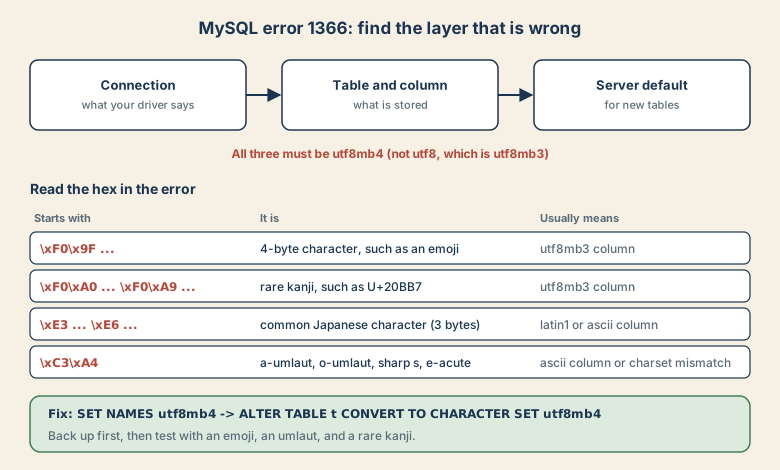
| First bytes in the error | What it is | Likely cause |
|---|---|---|
\xF0\x9F... |
A 4-byte character such as an emoji | Column is utf8mb3 (called utf8) |
\xF0\xA0... or \xF0\xA9... |
A rare 4-byte kanji such as 𠮷 or 𩸽, common in Japanese personal names | Column is utf8mb3 |
\xE3\x81... or \xE6... |
A common Japanese character (3 bytes) | Column or connection is latin1 or ascii |
\xC3\xA4 |
ä, ö, ü, ß, é (2 bytes) | Column is ascii, or the connection charset does not match |
The classic trap: in MySQL, utf8 is an alias for utf8mb3, which stores at most three bytes per character. The real UTF-8 is called utf8mb4. MySQL 8 defaults to utf8mb4, but older databases, hosted panels, and imported dumps are often still on utf8 or latin1.
Step 1: Look at what you have
SHOW VARIABLES LIKE 'character_set%';
SHOW VARIABLES LIKE 'collation%';
SHOW CREATE TABLE comments\G
Check three layers: the server or database default, the table and column, and the connection. All must agree.
Step 2: Fix the connection
Set utf8mb4 in your client or driver, not only on the table.
SET NAMES utf8mb4;
In code this is usually one option, for example charset=utf8mb4 in a PDO DSN, charset: 'utf8mb4' in Node's mysql2, or 'charset' => 'utf8mb4' in a Laravel database config.
Step 3: Convert the table
Back up first. Then:
ALTER DATABASE mydb CHARACTER SET utf8mb4 COLLATE utf8mb4_0900_ai_ci;
ALTER TABLE comments CONVERT TO CHARACTER SET utf8mb4 COLLATE utf8mb4_0900_ai_ci;
CONVERT TO changes the existing text columns as well as the table default. Changing only the table default leaves old columns as they were, which is a common mistake.
Index length. utf8mb4 reserves up to four bytes per character. A VARCHAR(255) index can need 1,020 bytes, which exceeded the old 767-byte limit on legacy row formats. Modern InnoDB with the DYNAMIC row format allows up to 3,072 bytes, so this mostly affects old servers. If you hit "Specified key was too long", check the row format or shorten the indexed prefix.
The collation traps
Accent-insensitive matching. The default utf8mb4_0900_ai_ci is accent- and case-insensitive. That means Müller equals Muller in comparisons and unique indexes. For Japanese, accent-insensitive collations can also treat voiced and unvoiced kana, such as か and が, as equal. If a unique key must tell these apart, use an _as_cs or _bin collation on that column.
Mixed collations. Joining a utf8mb3 table to a utf8mb4 table can raise "Illegal mix of collations" or stop an index from being used. Convert related tables together.
"Unknown collation: utf8mb4_0900_ai_ci". This appears when you import a MySQL 8 dump into MariaDB or an older MySQL, because that collation does not exist there. Either export with a compatible collation, or find-and-replace it in the dump with one the target supports, such as utf8mb4_unicode_ci. Check which collations your server offers with SHOW COLLATION LIKE 'utf8mb4%';.
When text is already garbled
If you see ä where ä should be, the bytes were probably written twice through the wrong encoding. Our guide on garbled umlauts and mojibake covers the patterns. One common repair for double-encoded data is:
UPDATE comments
SET body = CONVERT(CAST(CONVERT(body USING latin1) AS BINARY) USING utf8mb4)
WHERE body LIKE '%Ã%';
Run it on a copy first, and check the result by looking at HEX(body).
Japanese data in particular
Japanese needs utf8mb4 not only for emoji but for rare kanji in personal names. If you also need correct Japanese sorting, MySQL 8 offers Japanese collations. For search that splits words properly, see why full-text search fails on Japanese. And if the data travels through CSV, remember the pitfalls in Excel and CSV encoding.
Quick checklist
- Read the hex in the error to see which layer is wrong.
- Set the connection to utf8mb4.
- Back up, then
CONVERT TO CHARACTER SET utf8mb4for every affected table. - Pick a collation your server and every environment support.
- Test with an emoji,
ä,ß, and𠮷.
Sources
- MySQL reference: Unicode character sets (utf8mb4 and utf8mb3)
- MySQL reference: Converting between 3-byte and 4-byte Unicode
Written for MySQL 8 and recent MariaDB. Defaults and available collations differ by version, so check your server.