You add full-text search to your app. English works. Then a user searches for 知事 in a news article titled 東京都知事選 and gets zero results.
The cause: there are no spaces
Standard full-text engines find word boundaries by splitting on whitespace and punctuation. Japanese is written without spaces between words, so the whole phrase 東京都知事選 is indexed as one token. Searching for a word inside it cannot match.
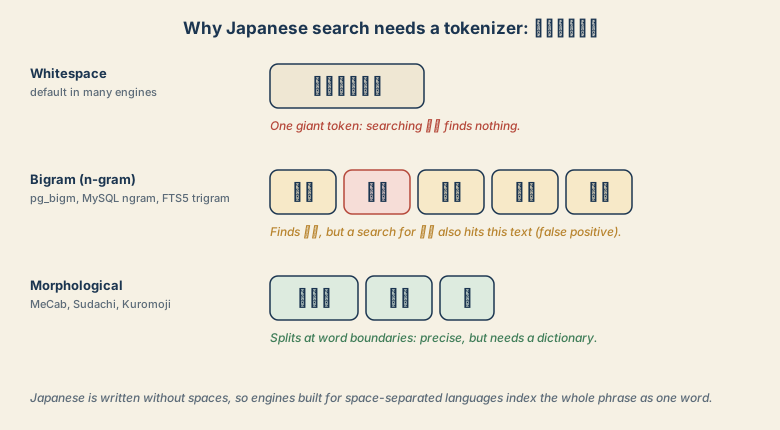
You have three families of fixes.
| Approach | How it works | Pros | Cons |
|---|---|---|---|
| N-gram (bigram/trigram) | Index every 2- or 3-character window | Simple, no dictionary | Larger index, false hits (京都 in 東京都) |
| Morphological analysis | A dictionary splits real words | Precise results | Dictionary and plugin to maintain |
LIKE '%q%' |
No index | Works everywhere | Slow on large tables |
SQLite: FTS5 trigram
CREATE VIRTUAL TABLE docs USING fts5(body, tokenize='trigram');
INSERT INTO docs(body) VALUES ('東京都知事選の結果');
SELECT * FROM docs WHERE docs MATCH '知事選';
The trigram tokenizer exists in SQLite 3.34 and later. It cannot use the index for queries shorter than three characters, so test your common two-character searches.
MySQL: built-in ngram parser
CREATE TABLE docs (
  id INT PRIMARY KEY AUTO_INCREMENT,
  body TEXT,
  FULLTEXT KEY ft_body (body) WITH PARSER ngram
) ENGINE=InnoDB DEFAULT CHARSET=utf8mb4;

SELECT * FROM docs WHERE MATCH(body) AGAINST('知事' IN BOOLEAN MODE);
The token size is controlled by the server option ngram_token_size (default 2). Changing it requires rebuilding the full-text indexes.
PostgreSQL: pg_bigm or PGroonga
PostgreSQL's built-in text search does not split Japanese. Two widely used extensions fill the gap:
CREATE EXTENSION pg_bigm;
CREATE INDEX docs_body_bigm ON docs USING gin (body gin_bigm_ops);
SELECT * FROM docs WHERE body LIKE '%知事%';
With pg_bigm, ordinary LIKE queries use a bigram index. PGroonga is a heavier option that adds more full-text features. Check that your hosting provider allows the extension you want.
Elasticsearch / OpenSearch: Kuromoji
For the best precision, use a morphological analyzer. Install the analysis-kuromoji plugin and set the analyzer on the field:
{
  "mappings": {
    "properties": {
      "body": { "type": "text", "analyzer": "kuromoji" }
    }
  }
}
Kuromoji splits 東京都知事選 into words, so 知事 matches and 京都 does not. Other engines such as Meilisearch and Typesense include CJK-aware tokenization; check their Japanese documentation for the details.
Which one should you choose?
- Side project or small app: SQLite trigram or MySQL ngram. Accept a few false hits.
- Postgres in production:
pg_bigmif you want to stay in the database. - Search is a core feature: Kuromoji (or a dedicated engine) so word boundaries are right.
Whatever you choose, normalize text first (full-width to half-width, composed kana) so that equivalent spellings match. See the NFC vs NFD guide.
Quick checklist
- Zero hits on a word inside a sentence? The tokenizer is not splitting Japanese.
- Need something working today? Use an n-gram option or
LIKE. - Need precise results? Use a morphological analyzer.
- Normalize both the stored text and the query.