You search for ガイドライン and the file is right there, but your program says no match. Or two database rows that look identical are counted as different people. In Japanese text this is very often a normalization problem, not a typo.
One character, two encodings
Voiced kana such as ガ can be encoded two ways:
- NFC (composed): one code point,
U+30AC. - NFD (decomposed):
カ(U+30AB) followed by a combining voiced mark (U+3099).
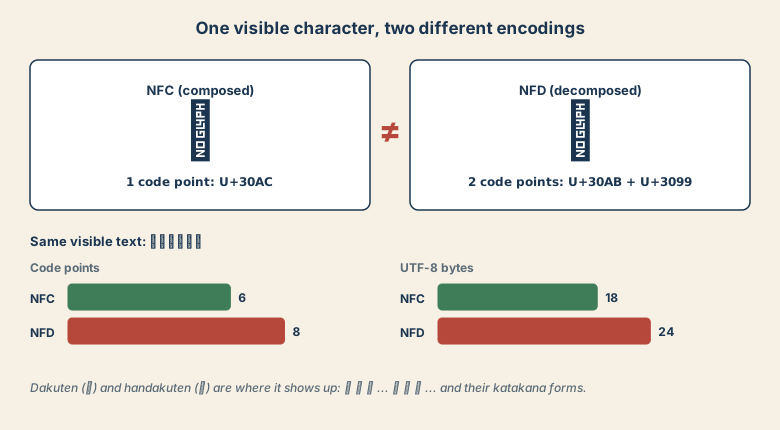
On screen they are the same. In code they are not:
import unicodedata as u

nfc = "ガイドライン"
nfd = u.normalize("NFD", nfc)

print(nfc == nfd)                  # False
print(len(nfc), len(nfd))          # 6 8
print(len(nfc.encode()), len(nfd.encode()))   # 18 24
print(u.normalize("NFC", nfd) == nfc)         # True
Where does the decomposed form come from? Historically, macOS file systems stored filenames decomposed, and text copied from some Mac apps, ZIP files made on macOS, and file names pulled through some sync tools can still arrive that way. On Windows or Linux, the same text typed from a keyboard is composed.
The fix: normalize at the boundary
Pick one form and convert incoming text right where it enters your system: file listings, uploads, form input, imports.
def norm(s: str) -> str:
    return unicodedata.normalize("NFC", s)
Compare and store the NFC form. This one step fixes most "invisible mismatch" bugs.
Half-width kana and full-width letters
Japanese data also contains half-width katakana (ガ, パソコン) from old systems, and full-width Latin letters and digits (ABC123). These are different code points from the characters you expect, so they will not match either. NFKC folds them:
| Input | After NFKC |
|---|---|
ガイド |
ガイド |
ABC123 |
ABC123 |
㈱ |
(株) |
① |
1 |
㌔ |
キロ |
The last three rows are the warning. NFKC is a compatibility normalization and it rewrites characters, so do not use it to store the original text. Use it to build a key for searching or deduplicating:
def search_key(s: str) -> str:
    return unicodedata.normalize("NFKC", s).casefold().strip()
Which form to use where
| Task | Use |
|---|---|
| Storing text, comparing filenames | NFC |
| Search index, deduplication, user-typed lookups | NFKC (+ casefold) on a copy |
| Writing to a legacy encoding | Check the target first (see the Shift_JIS vs CP932 guide) |
Quick checklist
- Same-looking strings that are unequal? Print
len()and the code points. - Filenames from macOS or ZIPs? Convert to NFC on ingest.
- Half-width kana or full-width digits in data? Build NFKC keys for matching.
- Never overwrite original text with NFKC output.