A page that looks perfect in your browser renders as □□□□□□ in a Puppeteer screenshot, a headless-Chrome PDF, or a chart made inside a container. Nothing is wrong with the text. The machine drawing it has no font that contains Japanese glyphs, so it draws the placeholder box people call tofu.
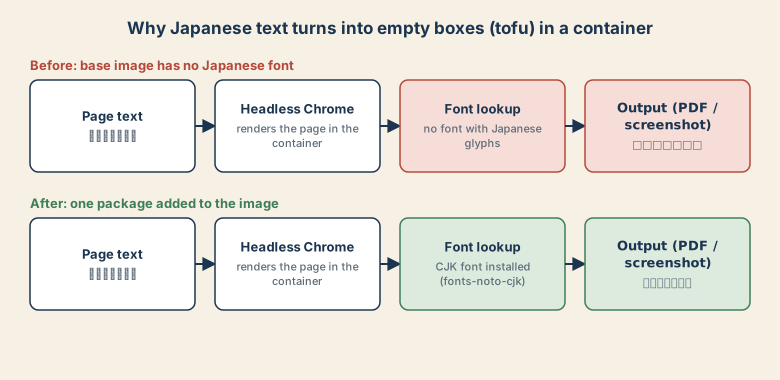
Why it only breaks in containers
Your laptop ships with Japanese fonts. Slim base images such as node:slim, python:slim, or Alpine ship only a minimal set. A rule like font-family: "Noto Sans JP" in your CSS only requests a font; it does not put a font file on the machine.
The fix
Add a CJK font package to the image.
Debian / Ubuntu:
RUN apt-get update && apt-get install -y --no-install-recommends \
    fonts-noto-cjk fontconfig \
    && fc-cache -f \
    && rm -rf /var/lib/apt/lists/*
Alpine:
RUN apk add --no-cache font-noto-cjk fontconfig && fc-cache -f
If your pages also use emoji, add fonts-noto-color-emoji, or you will get boxes for those too.
Verify inside the container
Do not guess. Ask the font system:
fc-list :lang=ja | head
fc-match "sans-serif:lang=ja"
The first command should list at least one font. The second shows which font the system picks for Japanese sans-serif text. If both are empty or point to a font that has no Japanese, the install did not take effect.
If it still shows boxes
Test with a minimal page that contains only a line of Japanese, using the same image, browser build, and loading code as production. If the minimal page works, the difference is in your real page's fonts or print styles. Also check that you are not rendering before a web font has finished loading; wait for document.fonts.ready before capturing.
Japanese shows, but the shapes look Chinese
Japanese and Chinese share many Han characters, and fonts draw some of them differently (for example 直 or 骨). If the system picks a Chinese font, Japanese text can look subtly wrong. Fix it in two places:
<html lang="ja">
body { font-family: "Noto Sans CJK JP", "Noto Sans JP", sans-serif; }
The lang attribute tells the renderer which regional variant to prefer.
PDF libraries that do not use a browser
Libraries such as ReportLab or FPDF do not use system fonts automatically. Register a font explicitly. With ReportLab, one option is a built-in Japanese CID font:
from reportlab.pdfbase import pdfmetrics
from reportlab.pdfbase.cidfonts import UnicodeCIDFont

pdfmetrics.registerFont(UnicodeCIDFont("HeiseiKakuGo-W5"))
# canvas.setFont("HeiseiKakuGo-W5", 12)
For better typography, register a TrueType font file you have the license to embed.
Quick checklist
- Boxes in screenshots or PDFs from a container: install a CJK font in the image.
- Confirm with
fc-list :lang=ja. - Set
lang="ja"and a Japanese-first font stack to avoid Chinese-looking glyphs. - Non-browser PDF tools need the font registered in code.