You run open("data.csv").read() on a file from Japan and get this:
UnicodeDecodeError: 'utf-8' codec can't decode byte 0x83 in position 0: invalid start byte
The file is almost certainly not UTF-8. Python used UTF-8 by default, hit a byte that cannot start a UTF-8 character, and stopped.
Recognize the bytes
Japanese text mostly falls into two byte layouts. Look at the first non-ASCII byte:
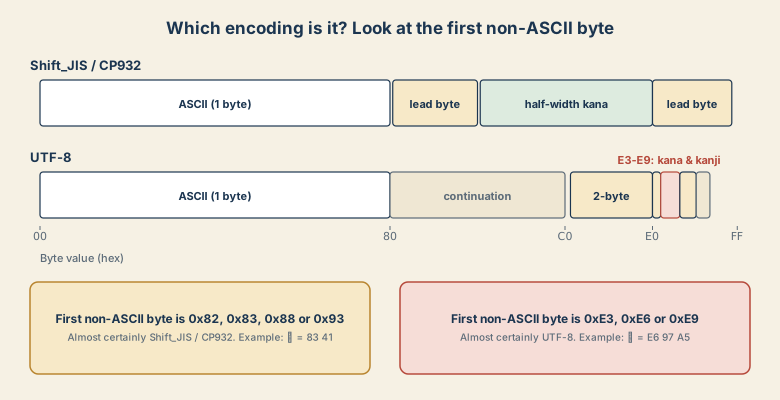
- Shift_JIS / CP932 uses lead bytes
0x81–0x9Fand0xE0–0xFC, and single bytes0xA1–0xDFfor half-width katakana. Hiragana and katakana start with0x82or0x83, and common kanji start in the0x88–0x9Fand0xE0+ range.アis83 41. - UTF-8 encodes kana and kanji as three bytes that begin with
0xE3–0xE9.日isE6 97 A5.
You can look at the raw bytes directly:
raw = open("data.csv", "rb").read(64)
print(raw)          # b'\x83A\x83C...'  -> Shift_JIS-looking
print(raw[:3] == b"\xef\xbb\xbf")   # True means UTF-8 with BOM
Pick the encoding
Valid UTF-8 has strict rules, so Japanese text that decodes as UTF-8 almost never does so by accident. CP932 is the opposite: it accepts most byte sequences. That is why the order matters.
def read_text(path):
    raw = open(path, "rb").read()
    for enc in ("utf-8-sig", "cp932"):
        try:
            return raw.decode(enc), enc
        except UnicodeDecodeError:
            continue
    raise ValueError("Unknown encoding; try charset-normalizer")

text, enc = read_text("data.csv")
print(enc)
With pandas:
import pandas as pd
df = pd.read_csv("data.csv", encoding="cp932")
# if a few bad bytes remain:
df = pd.read_csv("data.csv", encoding="cp932", encoding_errors="replace")
The silent failure
The reverse mistake does not always raise an error. Reading a UTF-8 file as cp932 often succeeds and gives you text like 譌・譛ャ隱. Your script runs, and your data is quietly wrong. So after you decode, print a sample and check that it reads as Japanese.
When you are not sure
Use a detector as a hint:
from charset_normalizer import from_path
best = from_path("data.csv").best()
print(best.encoding if best else None)
On the command line, nkf (a Japanese-origin tool) is handy. nkf -g data.csv guesses the encoding and nkf -w data.csv > utf8.csv converts to UTF-8. iconv -f CP932 -t UTF-8 in.csv > out.csv also works.
Quick checklist
- Error mentions byte
0x82,0x83,0x88, or0x93? Trycp932. - UTF-8 first,
cp932second; never the other way around. - BOM present? Use
utf-8-sig. - Always read a sample of the decoded text before trusting it.