For most of 2025 the message about Windows 10 was simple: support ends on 14 October 2025, and a one-year bridge ends on 13 October 2026. That date has now moved. If you read an older article saying free updates stop in October 2026, it is out of date.
What changed
Microsoft extended the consumer Extended Security Updates (ESU) programme by one year, to 12 October 2027. The news appeared as an editor's note on a Windows blog post and in updated support pages, dated 25 June 2026, rather than in a formal announcement. People already enrolled are continued automatically.
What ESU is, and what it is not
ESU provides critical and important security updates for Windows 10 version 22H2. It does not add features, fix ordinary bugs, or bring technical support. Think of it as a seatbelt for an ageing car: worth having while you arrange something better.
Who can enrol
- The PC runs Windows 10 version 22H2 (Home, Pro, Pro Education, or Pro for Workstations) with the latest updates installed.
- You sign in with an administrator Microsoft account. Local accounts are prompted to switch, and child accounts are not eligible.
- Microsoft lists three routes: turn on Windows Backup to sync settings at no extra cost, redeem 1,000 Microsoft Rewards points, or buy a one-year licence for 30 US dollars plus applicable tax. Prices in other currencies vary.
- One licence can be used on up to 10 devices.
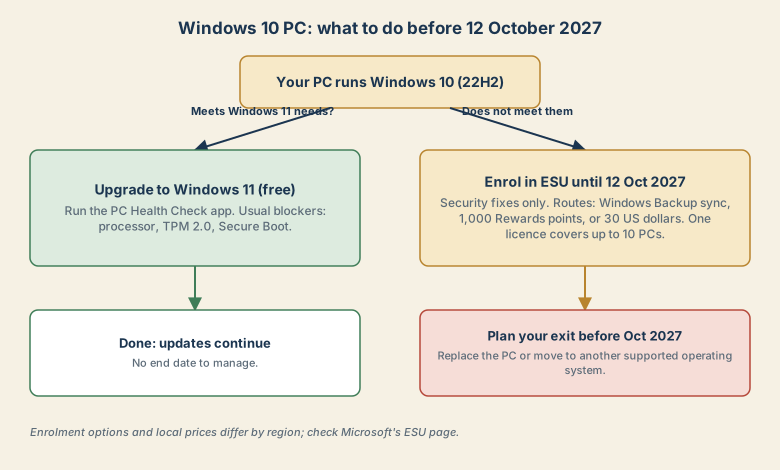
A simple decision path
- Does the PC meet the Windows 11 requirements? Run the PC Health Check app. A supported processor, TPM 2.0, and Secure Boot capable firmware are the usual sticking points. If yes, upgrade. It is free and ends the ESU question.
- If not, enrol in ESU now. There is no benefit in waiting, and enrolling does not stop you upgrading later.
- Set a date to leave. Treat 12 October 2027 as the deadline for a replacement PC, or for moving to another supported operating system.
- Reduce exposure in the meantime. Keep your browser updated, use a standard (non-admin) account for daily work, keep backups, and avoid running the old PC for high-risk tasks.
Why the extension matters for security
Unsupported systems are a favourite target. Attackers often reuse flaws that were patched years earlier, as in the case of Synology NAS ransomware that exploited a flaw patched in 2024. An unpatched PC is exposed in the same way: the weakness is public, and only the fix is missing.
Sources
- Help Net Security: Microsoft gives Windows 10 users an extra year of free security updates (26 June 2026)
- Microsoft: Windows 10 Extended Security Updates
Details as of November 6, 2026. Enrolment options and local pricing can change, so check Microsoft's page for your region.