Updating WordPress is the standard advice, and this time the update itself was the weak spot. A researcher at Picus Security found a race condition in the WordPress core updater that can let an unauthenticated attacker replace a site's live configuration file during a core update. The flaw is CVE-2026-119977, rated CVSS 8.1. On November 3, 2026, the US cyber agency CISA added it to its Known Exploited Vulnerabilities catalog, which means it is being used in real attacks.
What the bug does
When WordPress performs a full core update, it unpacks the new version into a temporary folder under wp-content/upgrade/. On a typical site that folder sits inside the public web root, so the extracted files are effectively a second, temporary WordPress installation that can be reached over the web.
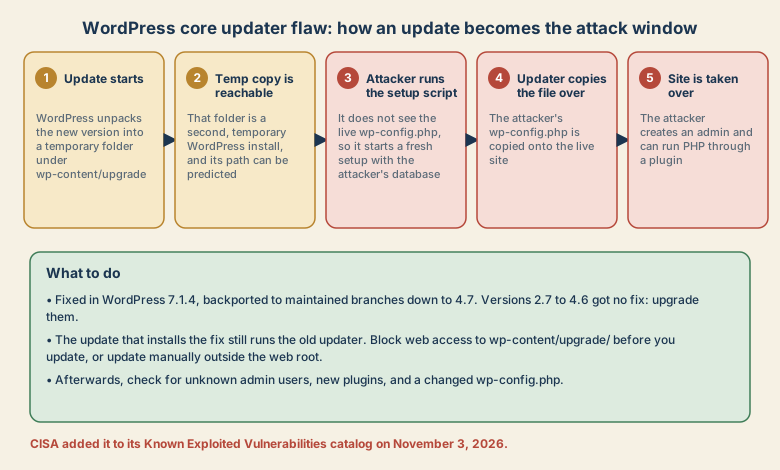
The temporary copy has an installer that does not find your real wp-config.php, so it decides WordPress has not been set up. An attacker who can guess the folder name can then run the setup, point it at a database they control, and make it write a wp-config.php in the temporary folder. When the updater copies the new files onto the live site, that file is copied too, and your site now talks to the attacker's database. The attacker can create the first administrator and, on a typical site, upload a plugin to run PHP code.
Who is affected
The researcher says the underlying updater behaviour affects WordPress 2.7.0 through 7.1.3, with conditions:
- The update must use a package that contains the installer files, which includes the usual full-core packages.
- The attacker must be able to determine the temporary folder name. In most version ranges it can be derived from the package name. In 4.4.0 through 5.8.18 a random suffix makes this harder, and those versions are exploitable only if the path leaks some other way.
The researcher also says the bug has been in the updater since WordPress 2.7, released in 2008.
The catch: the first update is still exposed
WordPress 7.1.4, released on October 28, 2026, fixes this by changing how the working folder is created and by stopping wp-config.php from being copied during a core update. The fix was backported to every maintained branch down to 4.7. Versions 2.7 to 4.6 did not receive a fix and should be upgraded to a supported version.
The catch is that a core update runs code from two versions. Unpacking is done by the updater you already have installed, which is the old one. So when a site updates to 7.1.4, the temporary folder is still predictable during that update. The new code does stop wp-config.php from being overwritten, but an attacker can still use the temporary copy to run code with the web server's privileges before it is cleaned up. Clicking Update Now on an unpatched site therefore leaves one last window open.
What to do
- Find your version. The dashboard footer or the Updates screen shows it.
- Before you update, block web access to
wp-content/upgrade/. WordPress reads and writes this folder through the filesystem and never needs to serve it over HTTP, so blocking it does not break updates.- Nginx:
location ^~ /wp-content/upgrade/ { deny all; } - Apache virtual host:
Require all deniedfor that directory. - Only
.htaccessaccess: addRedirectMatch 403 ^/wp-content/upgrade/in the WordPress root, above the WordPress rules. Do not put an.htaccessfile inside the upgrade folder itself, because the old updater deletes everything in it. - Confirm that a request to
/wp-content/upgrade/returns 403.
- Nginx:
- Update to 7.1.4, or the latest security release of your branch. Back up files and the database first.
- Or update manually, by downloading the release and copying the core files into place from outside the web root, leaving
wp-config.phpandwp-contentalone. The researcher notes that the WP-CLI commandwp core updateis not a substitute, because it uses the same updater. - Check for compromise if you updated recently on an unblocked site: unknown admin users, plugins you did not install, a changed
wp-config.php(especially the database name and host), and log entries forsetup-config.phpunderwp-content/upgrade.
If you find signs of a takeover, do not just clean up. Restore from a known-good backup, rotate the database and admin passwords, and update the secret keys.
Why it matters beyond WordPress
- Update tools are privileged code paths. The component that changes your files has more access than almost anything else, and its own weaknesses matter more.
- Fixes can arrive in two steps. The patch protects later updates, and the update that installs it may need extra care.
- The window is short. CISA reported exploitation within days of the fix, and set a federal deadline of November 6.
The researcher said the flaw was found with the help of an AI model in about four hours. That is his account, but it fits a wider point he makes: finding old bugs is getting cheaper, so patching windows matter more.
Quick checklist
- Check your WordPress version.
- Block
/wp-content/upgrade/from the web and confirm it returns 403. - Back up, then update to 7.1.4 or your branch's latest release.
- Check for new admins, unknown plugins, and a changed
wp-config.php. - Ask your host what it has done if it manages updates for you.
Sources
- Picus Security: CVE-2026-119977, When Updating WordPress Becomes the Vulnerability
- BleepingComputer: CISA flags WordPress RCE flaw as actively exploited in attacks
- CISA: Known Exploited Vulnerabilities Catalog
Reported as of November 7, 2026. Check the WordPress security announcement for current guidance.
Related: Software is now a product in the EU and a security tool's own update delivered the backdoor.