You receive a ZIP from a colleague in Japan. You extract it and get ô·û{îΩ.txt instead of 日本語.txt. The data is fine; the names are being read with the wrong encoding.
Why ZIP gets this wrong
The ZIP format began in the 1980s with filenames in the old DOS character set (CP437). Later, the format added one flag, bit 11 of the general-purpose flags, to say "this name is UTF-8". Tools that set the flag are read correctly everywhere. Tools that do not set it leave readers to guess.
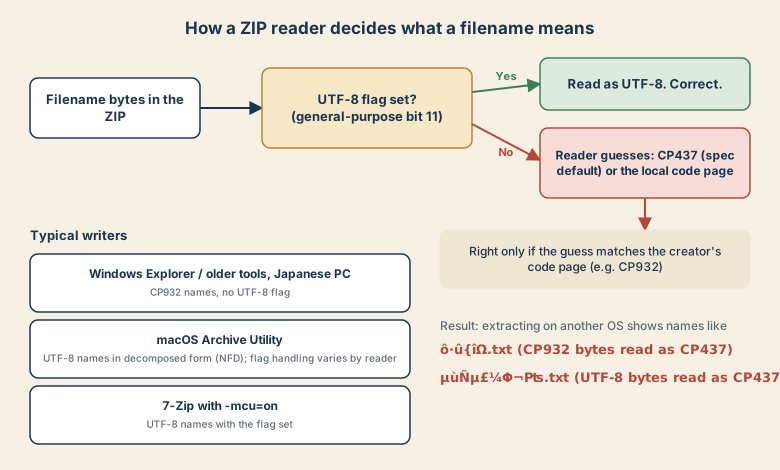
Many Windows tools, especially on Japanese-locale systems, store names in CP932 without the flag. Extract that on a Mac or a Linux server using the default guess and you get mojibake. The reverse also happens: archives created on macOS use UTF-8 names (often in decomposed form), and older Windows tools can misread them.
Fix on Linux: tell unzip the encoding
On Debian and Ubuntu, the unzip package supports an encoding option:
unzip -O CP932 from_japan.zip -d out/
The Mac's bundled unzip may not offer -O. A GUI tool such as The Unarchiver, which detects encodings, is the easy route there.
Fix in Python: re-decode the names
Python's zipfile decodes names as CP437 when the UTF-8 flag is missing. Because CP437 maps all 256 byte values to characters, you can reverse that step and decode the original bytes as CP932:
import os
import zipfile

def real_name(info, legacy="cp932"):
    name = info.filename
    if not info.flag_bits & 0x800:        # UTF-8 flag not set
        name = name.encode("cp437").decode(legacy)
    return name

base = os.path.abspath("out")
with zipfile.ZipFile("from_japan.zip") as z:
    for info in z.infolist():
        dest = os.path.abspath(os.path.join(base, real_name(info)))
        if not dest.startswith(base + os.sep):
            continue                       # skip suspicious paths
        if info.is_dir():
            os.makedirs(dest, exist_ok=True)
            continue
        os.makedirs(os.path.dirname(dest), exist_ok=True)
        with z.open(info) as src, open(dest, "wb") as dst:
            dst.write(src.read())
Run it on a small archive first and check the extracted names. If they still look wrong, try "shift_jis" or another legacy encoding.
Make ZIPs that travel
If you create the archive for people on other systems:
- 7-Zip:
7z a -tzip -mcu=on archive.zip folder/stores names as UTF-8 and sets the flag. - ASCII filenames: if you control the names,
report-2026.xlsxnever breaks. - Another format: the 7z format stores names as Unicode, if the recipient can open it.
The voiced-mark problem
Files from macOS often have names in NFD, where が is か plus a combining mark. In some tools it looks identical but will not match a search for the normal form, and editing the name may delete only the mark. After extraction, convert names to NFC. The NFC vs NFD guide shows how.
Quick checklist
- Names garbled but files open? Encoding guess, not corruption.
- Linux:
unzip -O CP932. - Scripted: re-decode CP437 → CP932 when flag bit 11 is not set.
- Creating: 7-Zip with
-mcu=on, or ASCII names.