A text says your package could not be delivered. An email says your account will be closed. You click, and a moment later you realise the page looks wrong. Almost everyone does this at some point. What matters is the next hour.
First: stay calm and work out what happened
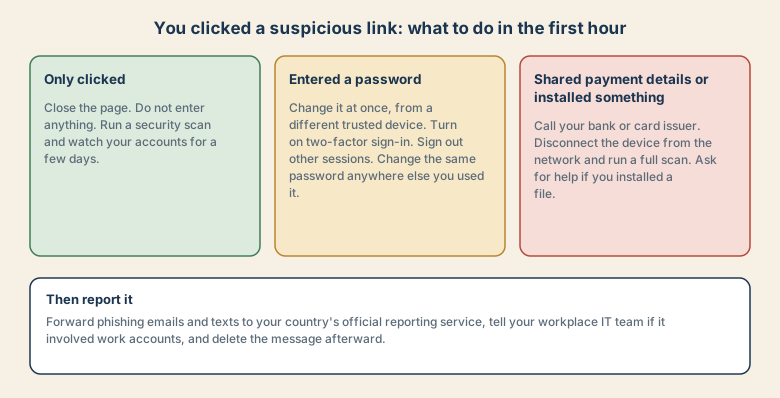
Do not enter anything more. Then decide which of three situations you are in:
- You only clicked the link and closed the page.
- You entered a password or sign-in code.
- You shared payment details, or you downloaded or installed something.
If you only clicked
- Close the page and the browser tab.
- Run a security scan with your device's built-in protection or a trusted tool.
- Keep the system and browser updated.
- Watch your accounts and messages for a few days, and be careful with any message that follows up.
Visiting a page alone is usually low risk. The danger starts when you give information or open a file.
If you entered a password
Act fast, and use a different trusted device, such as another phone or computer, in case the one you used is affected.
- Change the password for that account.
- Change the same password anywhere else you used it. Attackers try it on other sites.
- Turn on two-factor sign-in if it is off.
- Sign out other sessions and devices from the account's security settings.
- Check the account for changes, such as new forwarding rules in email, new recovery addresses, or new devices.
If it was your email password, treat it as the highest priority, because password resets for other accounts arrive there.
If you shared payment details or installed something
- Call your bank or card issuer using the number on your card or the official app, not a number from the message. Ask them to block or replace the card and check for unfamiliar payments.
- If you downloaded or opened a file, disconnect the device from the network, run a full scan, and ask a trusted person or your IT team for help. Do not pay anyone who contacts you offering to fix it.
- If you used the same password on other accounts, change those too.
Report it, then delete it
Reporting helps others. Forward the message to your country's official reporting service, such as the one run by your national cyber security agency, consumer protection authority, or your phone carrier's spam reporting number. If it involved work accounts or a work device, tell your IT team straight away, even if you feel embarrassed. Early reports limit the damage.
How to spot it next time
- Urgency or fear, such as "act within 24 hours".
- A link to confirm something, when you did not expect a message.
- A sender address or web address that is slightly wrong.
- A request for passwords, codes, or card details. Real services do not ask for these by message.
When in doubt, do not use the link. Open the official app or type the service's web address yourself.
Why smart people click
Phishing works on emotion and timing, not on gullibility. It arrives when you are busy, tired, or expecting a message, and it creates urgency: a missed delivery, a locked account, a payment problem. Messages are now well written, with real logos and plausible addresses. Clicking is a reflex, so the goal is a calm, practised response, not blame.
What attackers can do with each thing they get
| What you gave | What they can try | Your priority |
|---|---|---|
| Nothing, you only clicked | Probe for weak browsers or ask for more | Close, scan, watch |
| A password | Sign in to the account, then try the same password elsewhere | Change it from a trusted device, turn on 2FA |
| A one-time code | Complete a sign-in in real time | Treat the account as compromised and secure it |
| Card details | Make purchases or sell the card | Call the bank at once |
| An installed file | Take control of the device or steal data | Disconnect, scan, get help |
Warning signs, in more detail
- Urgency or threats: "within 24 hours", "your account will be closed".
- An unexpected link or attachment, especially from a brand you rarely deal with.
- A web address that is almost right, such as an extra word, a different ending, or a swapped letter.
- Requests for sensitive details: passwords, one-time codes, full card numbers.
- Generic greetings that do not use your name, though many scams now do.
- A QR code in an unexpected message, a poster, or a parking sticker, which can hide a harmful link.
Common mistakes after clicking
- Changing the password on the same device you used to click, in case it is affected.
- Deleting everything at once. Keep a screenshot, or forward the message to the reporting service, before you delete it.
- Staying silent at work because of embarrassment.
- Trusting a "fix-it" call or message from someone who found out you clicked. Real support does not cold-call.
- Forgetting other accounts that share the same password.
Prepare now, so a click hurts less
- Use a password manager so every account has a different password.
- Turn on two-factor sign-in, preferably with an authenticator app, passkey, or security key.
- Turn on card transaction alerts with your bank.
- Where your country allows it, consider a credit freeze or fraud alert if identity details were exposed.
- Keep your phone and computer updated.
At work: what your IT team needs to know
If it involved a work account or device, tell IT immediately and give them:
- When you clicked, and what the message said.
- What you entered or downloaded.
- Which device and which account you used.
- A screenshot or the original message, if you still have it.
Early reports let IT reset passwords and watch for misuse before it spreads.
Quick checklist
- Stop. Do not enter more information.
- Decide: only clicked, entered a password, or shared payment details or installed a file.
- Change passwords from a different trusted device, and turn on two-factor sign-in.
- Call your bank if card details were shared.
- Report the message, tell your IT team if it involves work, then delete it.
Save this cheat sheet
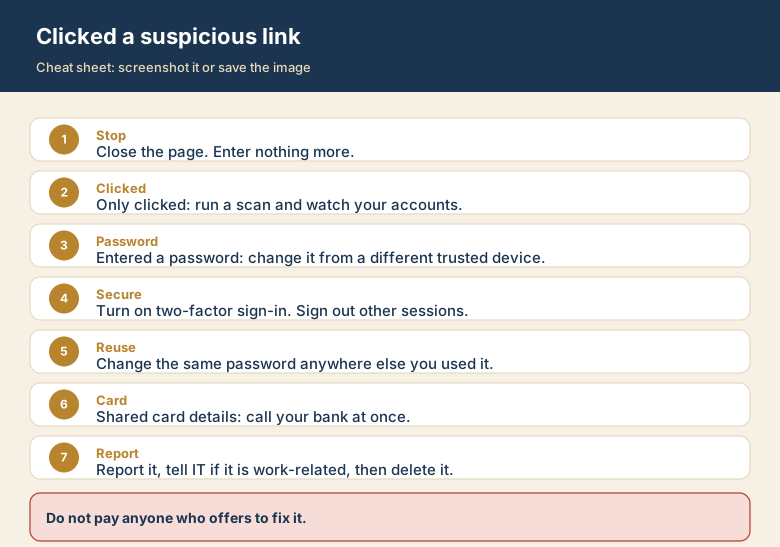
Screenshot this or save the image. It is the short version of the whole guide, and it is easier to find in a hurry than a web page.