Your phone was fine last month. Now it is at 20 percent by lunchtime. Before you buy a new phone or a battery case, spend three minutes checking what is using the power. The phone keeps a record.
Step 1: See what used the battery
- iPhone: Settings, Battery. You can switch between the last 24 hours and the last several days, and see usage by app.
- Android: Settings, Battery, then Battery usage. On some phones this is under Device care or Battery and device care.
Look at the top of the list, and at the screen time shown beside it.
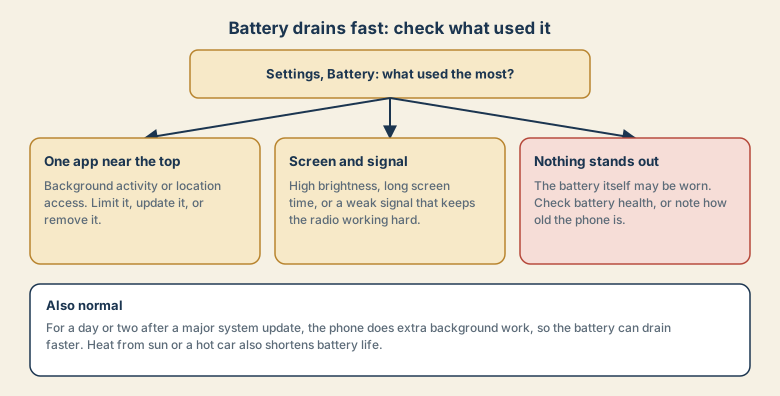
One app is near the top
If one app uses far more than it should, check:
- Background activity. Turn off background refresh for apps that do not need it.
- Location access. Set it to "While using" instead of "Always".
- An old version of the app. Update it, since bugs can cause constant activity.
- An app you barely use. Remove it.
Social, maps, and video apps are common causes because they use location, network, and screen at the same time.
The screen and signal use the most
- Screen brightness. Lower it, or turn on automatic brightness. The screen is often the biggest single user of power.
- Screen timeout. A shorter timeout turns the screen off sooner.
- Weak signal. In a basement or a poor coverage area, the phone boosts its radio and drains faster. Using Wi-Fi where available helps.
- Always-on features, such as an always-on display, that you do not need.
Nothing stands out
When no app stands out and the drain is steady, the battery itself may be worn. Batteries lose capacity with age and charge cycles.
- iPhone: Settings, Battery, Battery Health and Charging, then Maximum Capacity.
- Android: look for battery health in the battery settings, or in the maker's diagnostic app.
A phone that is a few years old and dies quickly may need a battery replacement rather than a new phone. Use the maker's service or an authorised repairer.
Things that are normal
- After a major system update, the phone does extra background work for a day or two, so the battery can drain faster. Give it a couple of days before judging.
- Heat. A hot car, direct sun, or a thick case while charging heats the battery and shortens its life.
- Cold. In low temperatures the battery may show a lower charge and recover when warm.
Quick wins
- Lower screen brightness and shorten the timeout.
- Restrict background refresh and location for apps that do not need them.
- Use Wi-Fi when you can.
- Update the system and apps.
- Use low power mode for a long day out.
How phone batteries age, in plain language
Phone batteries wear out with use. Each full charge and discharge adds a little wear, and heat adds more. Over a couple of years the battery holds less charge, so the same phone dies earlier in the day. That is why a phone that was fine when new feels weak later, even when no app is misbehaving. Batteries also drain faster when the phone is working hard, for example with a bright screen, a weak signal, or constant background activity.
Charging habits that help
- Avoid heat while charging. Take off a thick case if the phone gets hot, and do not charge in direct sun or a hot car.
- Use good chargers and cables, ideally ones made or certified for your phone.
- Use the built-in charging protections. iPhone has Optimized Battery Charging, and many Android phones offer Adaptive Charging or a charge limit.
- Avoid running it to zero and leaving it flat for days.
- Do not worry about topping up. Short charges are fine for modern phones.
Common mistakes
- Force-closing apps all day. Phones freeze unused apps on their own. Reopening a closed app can use more power than leaving it.
- Installing "battery saver" apps. They often use power themselves, and the built-in battery settings do the real work.
- Using cheap, uncertified chargers.
- Ignoring heat. A hot phone is a sign something is working too hard.
- Blaming a system update forever. A short period of extra drain after a big update is normal, but it should settle in a few days.
A five-minute battery audit
- Open the battery usage screen and look at the last 24 hours and the last several days.
- Note any app that is far higher than you expect.
- Check screen-on time against the total. If the screen dominates, adjust brightness and timeout.
- Check battery health, and note the phone's age.
- Look at location settings for apps set to Always.
Replace the battery or the phone?
- A battery replacement is worth considering if the phone is only a few years old, the battery health is low, and the phone still receives system updates. It is usually much cheaper than a new phone.
- A new phone makes more sense if the phone no longer receives security updates, or the repair costs close to the value of the phone.
Use the maker's service or an authorised repairer. A cheap, unknown repair can use poor parts and can be unsafe.
Quick checklist
- Open the battery usage screen first.
- One app high: limit, update, or remove it.
- Screen or signal high: adjust brightness, timeout, and use Wi-Fi.
- Nothing stands out: check battery health.
- Wait two days after a major update before judging.
Save this cheat sheet
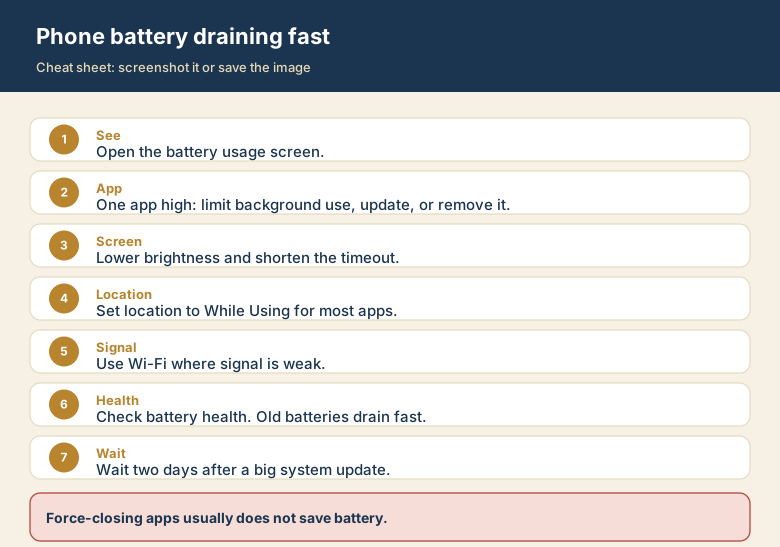
Screenshot this or save the image. It is the short version of the whole guide, and it is easier to find in a hurry than a web page.