Three small boxes at the top of every email, To, CC, and BCC, cause a surprising amount of embarrassment. A group email exposes everyone's address. A Reply All reaches people who never needed it. A private note goes to the wrong person because the name auto-completed. The rules are simple, and the habits that prevent mistakes are easy.
The one difference: who can see whom
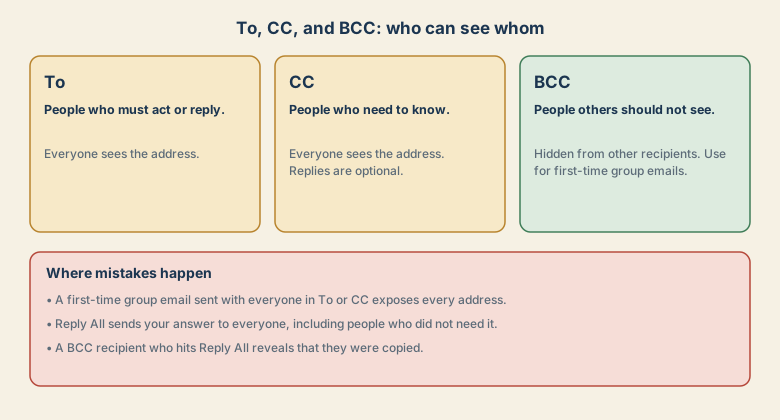
| Field | Who it is for | Can others see it? |
|---|---|---|
| To | People who must act or reply | Yes |
| CC | People who need to know | Yes |
| BCC | People the others should not see | No, hidden from other recipients |
"CC" means carbon copy, and "BCC" means blind carbon copy. The word "blind" is the key: other recipients cannot see that person.
When to use CC
- You want a manager or colleague to be informed without needing to act.
- You want a record that others saw the message.
- You want the recipient to know who else is in the loop.
CC also has a social effect. Copying someone's manager can feel like pressure. Use it with care, and leave it out when the message is sensitive.
When to use BCC
- You are emailing a group that does not know each other and should not see each other's addresses.
- You are introducing yourself to many people at once.
- You want to copy someone privately, and you are sure that is appropriate.
If you use BCC for a group, put your own address in To and everyone else in BCC. Then nobody's address is exposed.
Reply All: the other big trap
Reply All sends your reply to everyone on To and CC. Use it only when everyone really needs your reply. Before you press it:
- Look at the recipient list. How many people, and who?
- Ask whether each person needs this specific message.
- If your reply is a thank-you, an acknowledgement, or a private remark, reply only to the sender.
Replying to a long thread with "Thanks!" to hundreds of people is a classic mistake.
Where mistakes come from
- Auto-complete picks the wrong person. Two people with similar names are an easy slip.
- Forwarded threads carry old messages with details you did not mean to share.
- A BCC recipient replies to all and reveals the copy.
- A mailing list address is in the list, and the message reaches hundreds.
- Attachments are the wrong file or the wrong version.
A five-second check before sending
- Recipients: is every name and address correct, and is anyone missing or unexpected?
- Fields: is each person in To, CC, or BCC for the right reason?
- Subject and thread: does the quoted history contain anything private?
- Attachment: is it the right file, and does the message mention it?
- Tone: if it is angry or emotional, wait before sending.
Safety nets
- Gmail: open Settings and choose an Undo Send period. It gives you a few seconds to cancel after pressing Send.
- Outlook: a delay rule can hold messages for a minute before sending.
- Label external recipients if your system does that automatically, so you notice when someone outside your organisation is copied.
If you already made a mistake
- Do not reply again to everyone. That repeats the mistake.
- If you exposed addresses, tell the group briefly and ask them to delete the message.
- If personal or confidential data was involved, tell your manager or privacy team straight away. Some organisations have strict deadlines for reporting.
- Learn from it. Add a pause before sending, and check recipients.
Common mistakes
- Using CC for a first-time group email.
- Using Reply All for a short reaction.
- Forgetting the BCC list is hidden from you too, so check who you added.
- BCC-ing a boss to "keep a record" of a conflict, which can look bad if discovered.
- Sending bulk mail by BCC instead of a proper mailing service.
Examples: what goes where
| Situation | Suggested setup |
|---|---|
| Asking a colleague to approve a document | To: the colleague. CC: your manager only if they need to know |
| Inviting 30 customers to an event | To: your own address. BCC: all customers |
| Sending the minutes to the project team | To: team. No need for CC unless someone outside must see it |
| Introducing two people to each other | To: both people, so they have each other's address |
| Replying to a long thread with a thanks | Reply to the sender only |
Workplace etiquette
- Do not use CC as a weapon. Copying a person's boss to pressure them damages trust.
- Move people to BCC when they are done. When a thread no longer concerns someone, politely drop them from the conversation.
- Keep sensitive topics out of long threads. Start a new message for the right people.
- Be consistent. Teams that agree on when to CC and when to Reply All have fewer mistakes.
Quick checklist
- To means act. CC means know. BCC means private.
- Group email to people who do not know each other: BCC, with your own address in To.
- Think before Reply All.
- Check the recipient list every time.
- Turn on Undo Send.
Save this cheat sheet
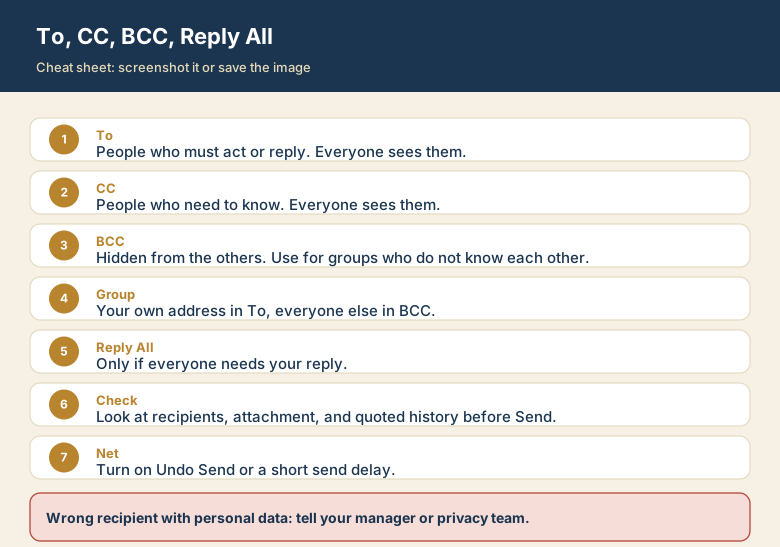
Screenshot this or save the image. It is the short version of the guide, and it is easier to find in a hurry than a web page.