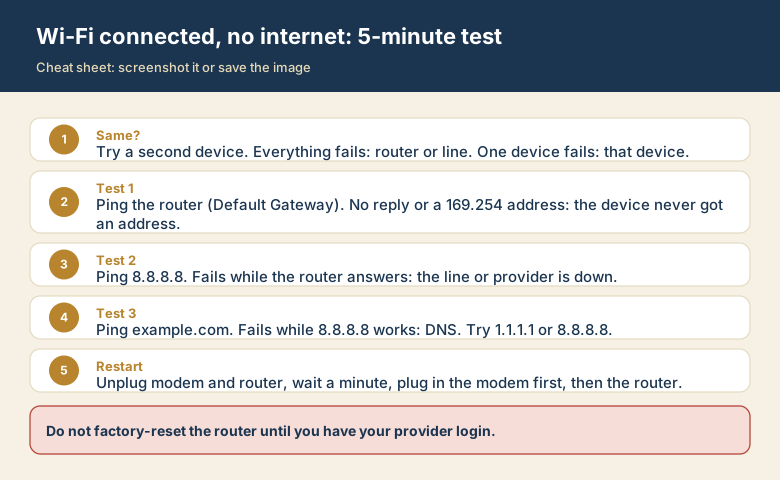
Your laptop shows full Wi-Fi bars, yet every page says "No internet" or fails to load. Many people hear "the internet" and think "Wi-Fi", so they restart everything at random. A better method is to test one link at a time, because each link fails for different reasons.
Wi-Fi is not the internet
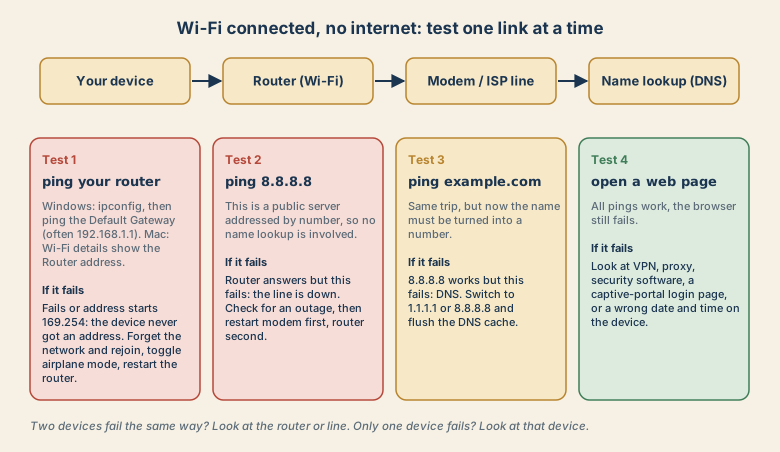
Think of a chain with four links:
- Your device to the router. This is the Wi-Fi part.
- The router to the modem and your provider's line.
- DNS, the phone book that turns
example.cominto a number. - The website itself.
Full Wi-Fi bars only prove link 1 is carrying a signal. Links 2 and 3 can be dead while link 1 looks perfect.
Step 0: Is it one device or all of them?
Check a second device on the same Wi-Fi (turn off mobile data on a phone so it cannot cheat).
- Only one device fails: the router and the line are probably fine. Jump to the device checks below.
- Every device fails: the router, the modem, or your provider is the problem.
Step 1: Can the device reach the router?
On Windows, open Command Prompt and run ipconfig. Find Default Gateway. It is often 192.168.1.1, 192.168.0.1, or 10.0.0.1. Then:
ping 192.168.1.1
On a Mac, open System Settings, Wi-Fi, Details for your network, then TCP/IP. The Router line is the address to ping with ping -c 4 <address> in Terminal.
- Replies come back: the device and router can talk. Go to step 2.
- No replies, or your address starts with
169.254: the device never received a normal address. Forget the network and join again, toggle airplane mode on and off, then restart the router.
Step 2: Can the router reach the internet?
ping 8.8.8.8
8.8.8.8 is a public server addressed by number, so no name lookup is involved. If the router answers in step 1 but this fails, the line between your router and your provider is down.
- Look at the modem lights. A light that is off, red, or blinking for a long time usually means no connection.
- Check your provider's outage page, using mobile data on your phone.
- Restart in the right order: unplug the modem and the router, wait about a minute, plug the modem in first, wait until its lights settle, then plug in the router.
Do not factory-reset the router yet. A reset erases your Wi-Fi name, password, and sometimes the login your provider needs. Keep it as a last resort.
Step 3: Does name lookup work?
ping example.com
If 8.8.8.8 replied but this fails, the line is fine and DNS is the broken link. Two fixes:
- Set the device (or the router) to use
1.1.1.1or8.8.8.8as its DNS server. - Flush the cached answers. Windows:
ipconfig /flushdns. Mac:sudo dscacheutil -flushcache; sudo killall -HUP mDNSResponder.
Step 4: Pings work but the browser still fails
When all three tests pass, the network is healthy and something on the device is in the way:
- VPN or proxy: disconnect the VPN and retry.
- Security software that filters web traffic: pause it for a minute to test.
- Captive portal: hotels, cafes, and airports show a login page before granting access. Open a plain
http://page such ashttp://neverssl.comto trigger it. - Wrong date or time: secure sites fail when the device clock is far off. Set the time to automatic.
Quick reference
| What you see | Likely broken link | First fix |
|---|---|---|
Router ping fails, or 169.254 address |
Device to router | Forget and rejoin the network; restart the router |
Router ping works, 8.8.8.8 fails |
Router to provider | Check outage; restart modem, then router |
8.8.8.8 works, example.com fails |
DNS | Change DNS; flush the DNS cache |
| All pings work, browser fails | Device settings | Turn off VPN or proxy; check the date and time |
Why "Wi-Fi" and "internet" get mixed up
In IT support, the most common misunderstanding is treating the Wi-Fi icon as proof that the internet works. The icon only reports the link between your device and your router. People restart the computer, reinstall apps, or reset the router when the real fault is a line outage outside the home. Once you see two separate links, the problem stops being mysterious.
How to read the ping results
The wording of a ping result is itself a clue.
- Replies with a time (for example
time=12ms): that link works. - "Request timed out": packets went out and nothing came back. For the router test, suspect Wi-Fi or the router. For
8.8.8.8, suspect the line. - "Destination host unreachable": your device has no route to the target, often because it has no valid address or is not really on the network.
- "Ping request could not find host" (Windows) or "cannot resolve" (Mac): the connection may be fine, but name lookup (DNS) failed.
- Some replies lost, or very uneven times: a weak or congested link, not a total outage.